
Metroid Prime 4: Beyond Switch NSP/XCI [Update]
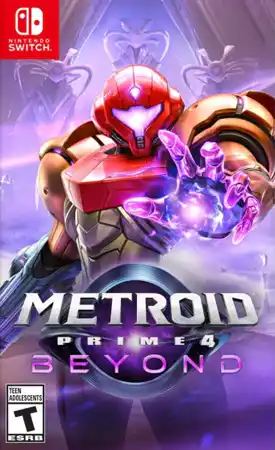
Metroid Prime 4: Beyond Switch is an Action-Shooter game Developed & Published by Nintendo, Released on 4th December 2025.
ScreenShots:

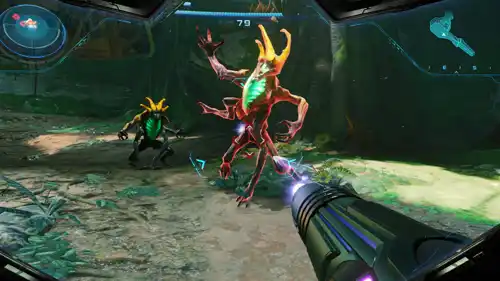
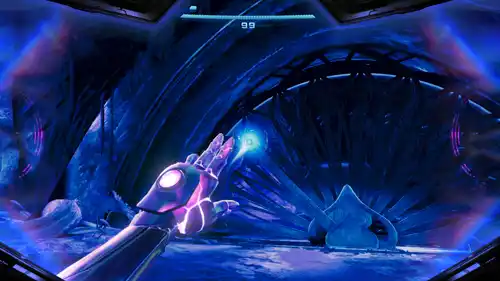
- How to Jailbreak/Hack Your Nintendo Switch –> Guide
- Switch Games Playable on PC with YUZU or Ryujinx
- For Installing NSP/XCI file use Tinfoil or DBI Installer
Metroid Prime 4: Beyond Switch Info:
Release Date: December 4, 2025
Genre: Action, Shooter
Publisher: Nintendo
Developer: Nintendo
Region: [Europe, USA, Asia, Japan]
Languages: English, Japanese, Spanish, French, German, Italian, Dutch, Portuguese, Korean, Chinese
Platform : Nintendo Switch
Required Firmware: Base – v19.0.0 | Update – v21.0.0
Rom Type: .NSP/XCI
Download (Base Game) Links: XCI [Dumped] – (25.8GB)
——————————————————————————————————-
MegaUp -> Part1 | Part2 | Part3 | Part4 | Part5 | Part6
SendCM -> Part1 | Part2 | Part3 | Part4 | Part5 | Part6
RapidGator -> Part1 | Part2 | Part3 | Part4 | Part5 | Part6
DataNodes -> Part1 | Part2 | Part3 | Part4 | Part5 | Part6
GoFile -> Part1 | Part2 | Part3 | Part4 | Part5 | Part6
VikingFile -> Part1 | Part2 | Part3 | Part4 | Part5 | Part6
1Fichier -> Part1 | Part2 | Part3 | Part4 | Part5 | Part6
Update v1.1.0 Links: – (916MB)
——————————————————————————————————–
MegaUp | SendCM | RapidGator | DataNodes | GoFile | 1Fichier
Notes:
- For How to Extract (Multi) RAR Parts check the FAQ Section, Dont Ask that on the comment.
- Update your Winrar Software, Old Version’s sometimes ask for Passwords.
- There is NO Password on any game Files we uploaded, All Games are Password Free.
- Check everything Properly, If any RAR file showing its damaged or you get RAR CRC Error, re-download them.
- If you are getting Broken/File Missing/Dead Links, –>> Request for Reupload.
If You Like This Game Then Buy IT, Support The Developers.


I can’t install the XCI on firmware 21.2.0 with DBI 874.It says:
Content meta not found. Installation aborted
ERRORS FOUND DURING FILE TRANSFER INSTALLATION
NxFileViewer says the file is original. My firmware is definitely high enough and I’m using the latest DBI. I don’t understand what going wrong here.
DBI also needs up to date keys to work well. Did you get the prod and tittle keys from 21.2.0 using Lockpick_RMC.bin?
ive tried so many times to get it to work but it boots to loading game in Eden then crashes after 5s or so. I set my VRAM to aggressive and same issue. Any ideas on what else i can do to fix it?
try Ryujinx canary -> https://git.ryujinx.app/Ryubing/Canary/releases
xci didnt work FW 21.1 dbi 844-ru
didnt work after the installation it tells me ok but the game wont appear on my switch ( the update appears to be fine ! )
Just finished the game on my OLED yesterday, some real time cutscenes were freezing, including the second cutscene before the ending. Is this just me or does it happen to anybody else? Reckon a reinstall will fix this?
It seems this happens on all Switch consoles that use a XCI version (or an NSP file converted from XCI) of Metroid Prime 4. These freezing scenes are actually video files; real-time cutscenes does not freezes. And it’s already been proven that the loading times for XCI files is slower compared to real NSP files on the Switch, so I believe that’s the cause of these freezes, since if you use a Metroid Prime 4 cartridge in Atmosphere, these freezing simply don’t happen. Unfortunately, nobody wants to offer a native eShop version of Prime 4, so there’s no way to solve this problem at the moment.
Update: it seems that the culprit was the emuNAND with file based mode (SD file) all the time. Creating a emuNAND with “SD partition” mode fixed the freezing issues entirely. The game now runs smooth every single time. So if you are experience freezing/stutters and are using a emuNAND file based, try to create a partition type and see how it goes.
Are the same problems in android consoles running an emulator?
To boot this game on the Eden emulator, you have to set your VRAM Usage Mode to Aggressive.
thanx man what you said to do did work thanx for the help and if you read this before the new years Happy New Years to you and your family
this game does NOT work on any of the PC Emulators neither
Please, can you upload the nsp version?
Many thanks for upload!
Greetings from Germany!
work fine.. my oled 21.1.0AMS install game on dbi v.851
ya actualice el firmware a v21.0.1 y sigpatches, y no instala.
Works on latest Citron but I can’t install this on oled and lite with firmware 19.01. Installing with TinWoo gives me some system error just after pressing install.
Update your firmware to v21.0.1 and sigpatches, available there -> https://ziperto.torrentbay.st/faq/#qaef-69392
Thanks!
Literally no xci will install on my switch.
I’ve tried DBI, AWOO, TinWOO, TinFoil.
I’ve updated to 21.1.0.
Any chance for an nsp version?
I have firmware 20.1.1 and DBI 658-en, but I get a “no tickets found, installation aborted” error. While I get that up-to-date firmware is a thing, this sounds like a distinctly different error.
crashes on citron for me, no start even with 21 firmware
hola admin el nsp cuando puede q salga xq hay error al instalar el xci nunca termina de instalar gracias
El juego funciona bien en Switch. Actualiza tu firmware a v21.0.1 y sigpatches, disponibles allí -> https://ziperto.torrentbay.st/faq/#qaef-69392, espera a NSP.
NO TERMINA DE INSTALARSE
I am here because of V door…
this dose not play on moded LITE
It won’t install, please help. In 99% whole system freeze and I have to reset Switch by holding power button. I already tried newest firmware V21, newest DBI, Tinfoil. Every other games installation works correctly but this one 🙁
anyone able to get this to work on any emu?
Wow!!!! Excelente, gracias!!!!
gofile is down
try other mirrors.
Hey, when I try to extract this and open it in Ryujinx, it basically says that there’s no game in the file? I think it might be bugged, I downloaded all the different parts and extracted them together and everything
No emulator i know of will play this at the moment.
To boot this game on the Eden emulator, you have to set your VRAM Usage Mode to Aggressive.
Not working on Eden
To boot this game on the Eden emulator, you have to set your VRAM Usage Mode to Aggressive.